
Why Is My Thermostat Screen Blank? Causes and Fixes
November 18, 2026
TL;DR
When a thermostat has no power, the fix is usually free or cheap. Work through the batteries, the breaker, the blower door, and the condensate drain, in that order. If the screen stays dark with no heat or cooling, call a licensed technician to check for a blown fuse or wiring short.
Key Takeaways
Hardwired and smart thermostats run on HVAC power, so the problem usually sits at the furnace, not the wall.
When the AC drain backs up, the float switch shuts the system down and often cuts the thermostat’s power too.
A blower door left unlatched after a filter change can blank the screen.
A lit or blinking furnace status light means the furnace has power, narrowing the search to the fuse, float switch, wiring, or thermostat.
Why Is My Thermostat Screen Blank?
A thermostat screen that is blank or not working has almost always lost power rather than broken. On a battery model, check the batteries. Hardwired and smart thermostats draw 24-volt power from the furnace or air handler, so the screen also goes dark when a breaker trips, the blower door is left open, a control-board fuse blows, or the condensate float switch trips.
Before you open any panel, turn off power at the furnace or air handler. The cabinet carries 120-volt wiring.
What Happened Right Before the Screen Went Blank?
| What You Notice | Most Likely Cause | Your First Move | Who Fixes It |
|---|---|---|---|
| The low-battery icon showed up first | Dead or weak batteries | Put in fresh batteries | You |
| It went blank right after new batteries | Batteries put in wrong, or the thermostat not seated | Reinstall them and reseat the thermostat | You |
| It went blank after a filter change or HVAC visit | Blower door safety switch left open | Reseat the furnace door with the power off | You |
| It went blank after a storm or power flicker | Tripped breaker or service switch off | Reset the breaker once and check the switch | You, once |
| It's cooling season and the drain pan has water | A clogged condensate drain tripped the float switch | Clear the drain with the power off | You or a pro |
| No heat or AC, but the furnace status light is on | Blown 3- or 5-amp board fuse or a short between furnace and thermostat | Call a technician | A pro |
| You just installed a smart thermostat | Missing or loose C-wire, or a wiring mistake | Recheck terminals with power off, or call the installer | A pro if unsure |
Thermostat Blank After Changing Batteries? Check These Four Things
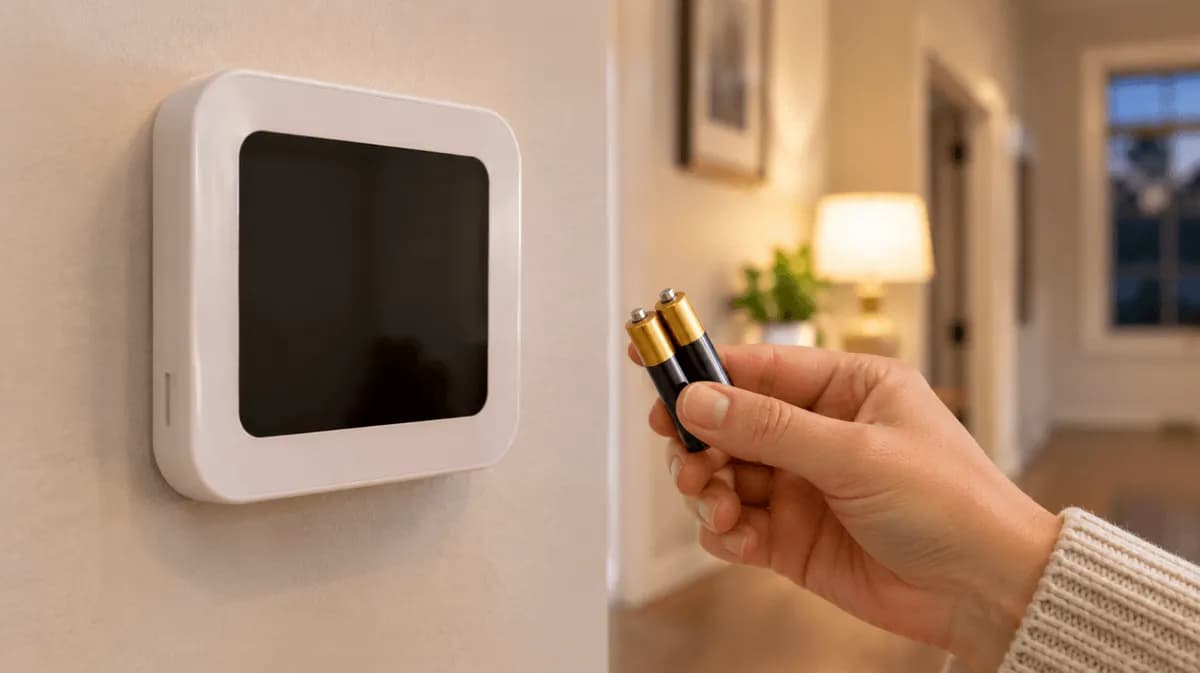
A screen that stays blank after a battery change usually means the batteries went in wrong, not that the thermostat died. Honeywell Home manuals list one fix first for a blank display: fresh AA alkaline batteries, correctly installed.
Direction. Line up each battery’s plus end with the mark in the tray. A single reversed cell keeps the whole display dark.
Type. Use the battery type your manual calls for. Many models want alkaline.
Seating. Press the thermostat onto its wall plate until it clicks, since the pins on the back carry the power.
Power source. On many hardwired thermostats, the batteries are only a backup. Honeywell suggests powering a common-wired model with batteries as a test. If it lights up on batteries alone, the problem is the 24-volt supply from your HVAC system.
Thermostat Blank After You Changed Your Air Filter? Check the Blower Door
A blower door that isn’t fully closed cuts power to the furnace and usually the thermostat. Honeywell Home lists making sure the furnace door is closed securely as a blank-display fix.
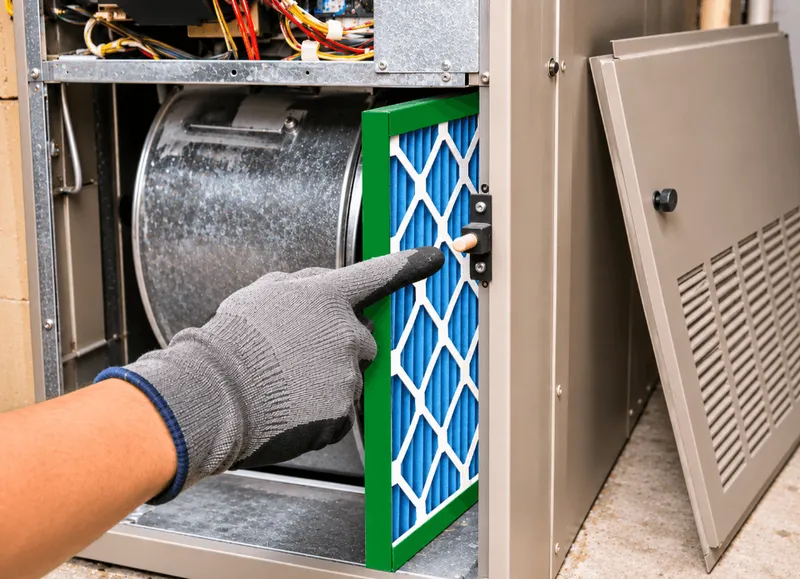
On many furnaces the filter slides into a rack beside or inside the blower compartment, as this guide on how to change a furnace filter shows. The panel over that compartment presses a small plunger called the door safety switch. If the panel goes back even slightly crooked, the switch stays open. Turn off the furnace and reseat the panel until both tabs latch. Then restore power.
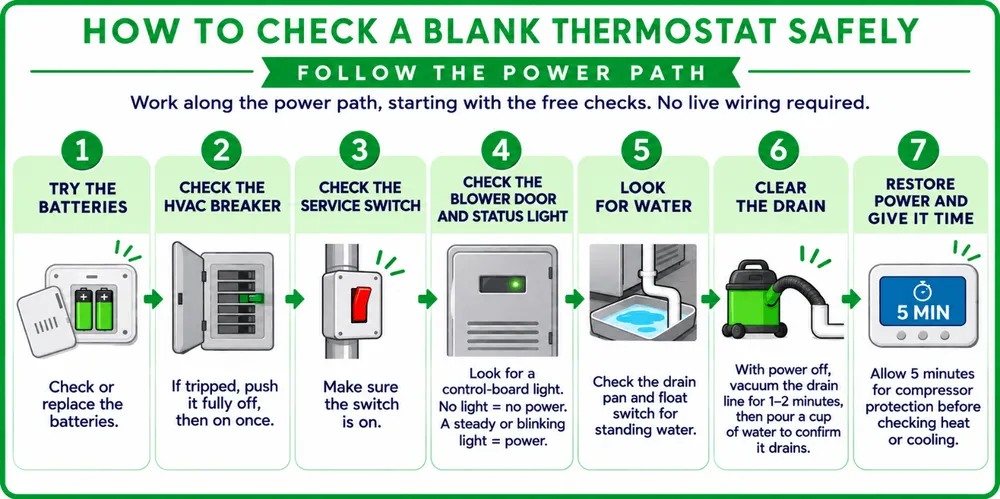
How to Check a Blank Thermostat Safely: Follow the Power Path
Work along the path power takes to the screen, starting with the free checks. None of them involves live wiring.
Try the batteries. Use the four checks above.
Check the HVAC breaker. A tripped breaker sits in the middle. Push it fully off, then on, just once.
Check the service switch. Make sure the light-style switch on or near the furnace is on.
Check the blower door and status light. With the panel latched, look for the control-board light many furnaces show through a small window in the door. No light usually means no power at the furnace, so recheck steps 2 and 3. A steady or blinking light means the furnace has power; the code chart inside the door explains the pattern.
Look for water. Check the drain pan under the indoor coil and the float switch, a small PVC fitting with two wires on the drain line or pan. Standing water means the float switch has tripped.
Clear the drain. With the power off, seal a wet/dry vacuum over the outdoor end of the condensate line for a minute or two. HVAC maker Carrier recommends the same suction method. Then pour a cup of water into the pan; once it drains, the float drops on its own.
Restore power and give it time. Honeywell Home manuals say to allow 5 minutes for compressor protection before deciding whether the system is calling for heat or cooling.
How a Clogged AC Drain Can Turn Off Your Thermostat
On many systems, the float switch shares the 24-volt circuit that powers the thermostat. When water backs up and lifts the float, the screen goes dark right away. Once the clog is cleared and the float drops, the screen typically comes back on its own.
That shutoff is by design. Connecticut’s State Building Inspector notes that the International Residential Code lists a UL 508 water-level detection device as one of four approved ways to guard against condensate overflow.
Your air filter plays a part too. The U.S. Department of Energy notes that when a filter clogs, air can slip around it and carry dirt into the evaporator coil. That dirt washes into the drain pan with the condensate and builds into the sludge that blocks the line.
What Not to Do When Your Thermostat Is Blank
| Avoid This | Why It Backfires |
|---|---|
| Bypassing or removing the float switch | The next clog can overflow onto ceilings or floors |
| Swapping a blown board fuse for a higher-amp one | It removes short protection and can burn out the transformer or board |
| Resetting a breaker that trips again | A second trip points to an electrical fault |
| Pulling thermostat wires with the power on | If two wires touch, the board fuse can blow |
When to Call a Licensed HVAC Technician
Still blank after every check above? Call a technician. The likely cause is a blown 3- or 5-amp fuse on the furnace control board, though a failed transformer or shorted thermostat wire can do the same.
Some signs call for help right away: a breaker that trips a second time, a burning smell at the furnace, water that returns to the pan within a day of clearing it, or a float switch that won’t reset after the pan is dry.
Before you call, jot down five things so the technician brings the right part:
Your thermostat’s brand and model, and whether it uses batteries
When the screen went dark and what happened just before (a storm, a filter change, a new thermostat)
Whether there’s water in the drain pan or around the float switch
What the furnace status light is doing, or that it’s off
Which checks on this page you’ve already tried
How to Keep Your Thermostat From Going Blank Again
To prevent a repeat, replace the thermostat batteries yearly and change your air filter on schedule. This guide on how often to change your air filter can help you set the interval, and the U.S. Department of Energy says a clean filter can cut AC energy use by 5% to 15%.
Flush the condensate drain each spring. Between professional visits, Carrier suggests pouring a cup of distilled vinegar into the drain line access point to slow buildup. Once the screen is back, review your settings with a season-by-season thermostat settings guide.
“When a thermostat screen goes blank, the wall is the last place to look. Walk to the furnace first: check that the panel clicked back into place after your last filter change, then look for water in the drain pan. Both checks are free.”
- Michelle Wan, Air Quality Writer
Supporting Statistics
Two-thirds of U.S. homes cool with central AC or a heat pump. Central systems typically power a hardwired thermostat with 24 volts, which a float switch or fuse can cut. Source: U.S. Energy Information Administration, 2020 RECS
42.1% of overheated AC homes blamed an equipment breakdown. That was 11.6 million households in 2023. Source: U.S. Census Bureau, 2023 American Housing Survey
Water damage claims average $15,400. About 1 in 60 insured homes files a water damage or freezing claim each year; condensate overflow is one of the leaks a float switch is designed to prevent.Source: Insurance Information Institute
Frequently Asked Questions
Can a Dirty Air Filter Make My Thermostat Go Blank?
Not directly, but it can set one up. A dirty filter lets dirt reach the drain pan, where it helps clog the line and trip the float switch. A pleated filter changed on schedule keeps most of that dirt out. Just reseat the blower door snugly afterward.
Do I Need a New Thermostat if the Screen Is Blank?
Rarely. Replace it only if it stays blank with fresh batteries and a technician confirms 24-volt power at its terminals. Until then, rule out the furnace, filter, and drain before replacing the wall unit.
Why Did My Smart Thermostat Go Blank?
Most smart thermostats need steady 24-volt power, usually through a C-wire. Models with a rechargeable battery go dark once that power drops long enough. Check the breaker, door, and drain, then the C-wire.
Why Did My Thermostat Go Blank with No Heat?
Start with the breaker and service switch, then the blower door. High-efficiency furnaces have their own float switch that can trip, and a blown board fuse shuts off heat and display together.
How Do I Reset a Thermostat with a Blank Screen?
Restore power first with the checks above, since a thermostat without power cannot reset. Once the screen returns, follow your model’s manual if it asks for a reset.
Glossary
24-volt control circuit. Low-voltage power from the HVAC transformer that runs the thermostat.
C-wire (common wire). The wire that gives a thermostat steady 24-volt power.
Condensate. Water the cooling coil pulls out of humid indoor air.
Condensate float switch. A safety switch that shuts the system off when the drain backs up.
Control-board fuse. A 3- or 5-amp blade fuse on the furnace board that protects the low-voltage circuit.
Door safety switch. A plunger switch that cuts furnace power whenever the blower panel is removed.
Furnace status light. An LED on the furnace control board, often visible through a small window in the blower door, that shows whether the furnace has power and flashes fault codes.
About the publisher and sources: This guide is published by Filterbuy, a U.S. maker of HVAC air filters. Honeywell Home (made by Resideo Technologies) and Carrier are cited for their published troubleshooting guidance only; neither sponsors or is affiliated with this guide.