
What Does 'Recovery' Mean on Your Thermostat?
November 17, 2026

TL;DR
When your thermostat says "Recovery," it has turned the heat or AC on early so your home reaches the next scheduled temperature right on time. It's a normal comfort feature, not an error. Honeywell calls it Adaptive Intelligent Recovery and ecobee calls it Smart Recovery, while Google Nest thermostats call it Early-On. If recovery keeps starting earlier, or your home still falls short, restricted airflow is a common and easy-to-fix cause, often from a dirty air filter. That's why the filter is the first thing to check before changing thermostat settings.
Key Takeaways
A thermostat in recovery mode is pre-heating or pre-cooling ahead of a scheduled change, such as Sleep to Wake.
Recovery doubles as a free airflow gauge. If it needs more minutes per degree in similar weather, check the filter first.
Honeywell thermostats display "Recovery," "In Recovery," or "Active Recovery" while recovery runs.
Swapping a clogged filter for a clean one can lower an air conditioner's energy use by 5% to 15%, according to the U.S. Department of Energy.
What Does "Recovery" Mean on a Thermostat?
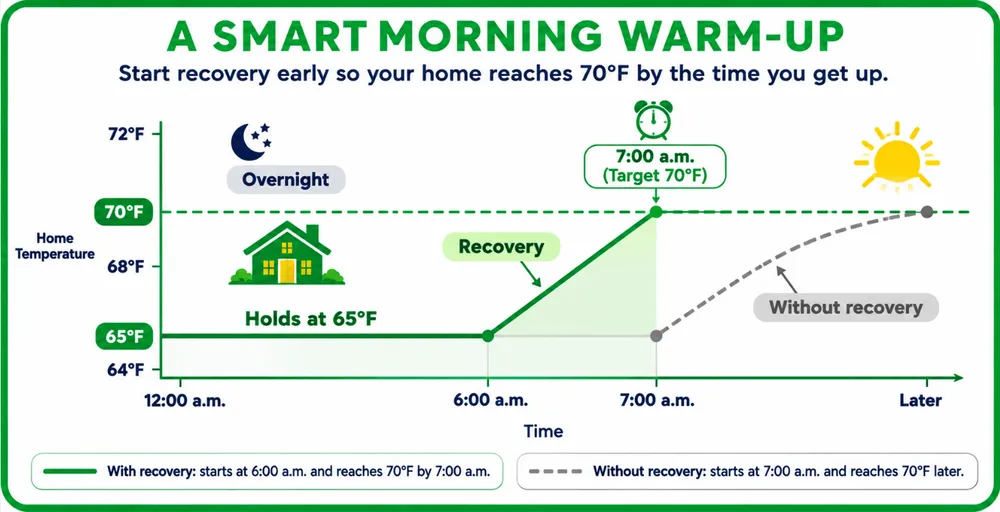
"Recovery" means your thermostat is bringing your home back from an energy-saving setback, and it started early so it can finish on schedule. Say your Wake period is set to 70°F at 6:00 a.m. With recovery on, the heat comes on before 6:00, so the house is already 70°F when you get up. One manufacturer's user manual uses this exact example. Nothing is wrong.
A basic programmable thermostat waits until the scheduled time to start, so your home reaches the target late.
Every degree your thermostat recovers is carried by air moving through the system, and that air passes through the air filter first. When airflow slows down, a longer recovery is often one of the first signs.
How Does Thermostat Recovery Mode Work?
Recovery mode learns how long your system takes to change your home's temperature, then works backward to pick a start time. Adaptive recovery can base that start time on how far the room is from the setting, how your equipment has performed before, and recent weather history.
A typical winter morning looks like this in one manufacturer's published example:
A winter morning with thermostat recovery
| Time | What the thermostat is doing | What the display shows |
|---|---|---|
| 10:00 p.m. | Sleep setback holds the home at 65°F | Sleep |
| 6:00 a.m. | Recovery starts; the furnace begins warming the home | Recovery |
| 7:00 a.m. | Home reaches 70°F right at the scheduled Wake time | Wake |
What Is Recovery Called on Honeywell, ecobee, and Nest Thermostats?
Honeywell Home thermostats, made by Resideo, use Adaptive Intelligent Recovery, also called Smart Recovery or Smart Start. On ecobee it's Smart Recovery. Google Nest uses Early-On, with True Radiant handling slow in-floor radiant heat.
Recovery feature names by thermostat brand
| Brand | Recovery feature name | What you'll see | Can you turn it off? |
|---|---|---|---|
| Honeywell Home (Resideo) | Adaptive Intelligent Recovery (also Smart Response) | "Recovery," "In Recovery," or "Active Recovery" on the display | Yes, in the thermostat menu on models like the T6 Pro and ElitePRO |
| ecobee | Smart Recovery | Heating or cooling runs before a schedule change | Yes, in the thermostat settings or the ecobee web portal |
| Google Nest | Early-On (True Radiant for radiant heat) | System starts before the scheduled time, with a time-to-temperature estimate | Yes, and you can cap how long it preheats |
Is It Bad if My Thermostat Says "Recovery"?
No. Seeing "Recovery" before a Wake or Return period is normal. It's only worth a look if recovery runs much longer than it used to or your home misses its target.
Why Is My Thermostat Recovery Taking So Long?
A long recovery usually means your system is moving less air than it should. Because recovery learns as it goes, the thermostat quietly starts earlier to compensate, which hides the problem. The easiest things to check are the filter and any closed vents or blocked returns.
Air quality writer Michelle Wan sums up why recovery and airflow are tied together:
"Every degree you ask for has to move through your heating system, and every setback has to be made up by it later."
- Michelle Wan, Air Quality Writer
ENERGY STAR notes that airflow problems can cut a system's efficiency by up to 15%.
Recovery warning signs, likely causes, and fixes
| Recovery warning sign | Likely cause | What to do |
|---|---|---|
| Recovery starts earlier each week in similar weather | Air filter loading up with dust and debris | Inspect the filter and replace it if it's gray or clogged |
| Home misses the scheduled temperature | Severe airflow restriction, an equipment fault, or extreme weather | Replace the filter and open vents; call a technician if it continues |
| Heat pump uses aux heat during most recoveries | Large setback, low airflow, or a heat pump problem | Shrink the setback, check the filter, schedule service |
| Weak airflow at the vents during recovery | Dirty filter, dirty coil, or blower issue | Replace the filter; book a tune-up if airflow stays weak |
A fresh filter only helps if it seals, though, which is why the technician who reviewed this article checks fit first:
"Homeowners bring me the old filter and ask what to buy. I ask for a photo of the empty slot instead. Half the time the filter they had been using was never right for the opening it sat in."
- David Clark, Licensed HVAC Technician
How Can You Use Recovery as a Free Airflow Gauge?
Your thermostat already times your system every morning. To turn that into a number, divide the minutes recovery starts early by the degrees your home has to recover. For example, a home that climbs from 65°F to 70°F in about 60 minutes is recovering at roughly 12 minutes per degree.
Note when "Recovery" appears on three or four mornings with similar weather, or check your app's history, since some apps mark when recovery was active. If the minutes per degree keep climbing while your setback and the weather hold steady, your system is moving heat more slowly, and the filter is the first thing to check.
Colder mornings need more lead time, and a new or reset thermostat needs time to learn: manufacturers put that learning period at anywhere from a few days to about a week.
How Do You Check Your System When Recovery Runs Long?
A quick airflow check rules out the simplest fixes first, starting with the filter.
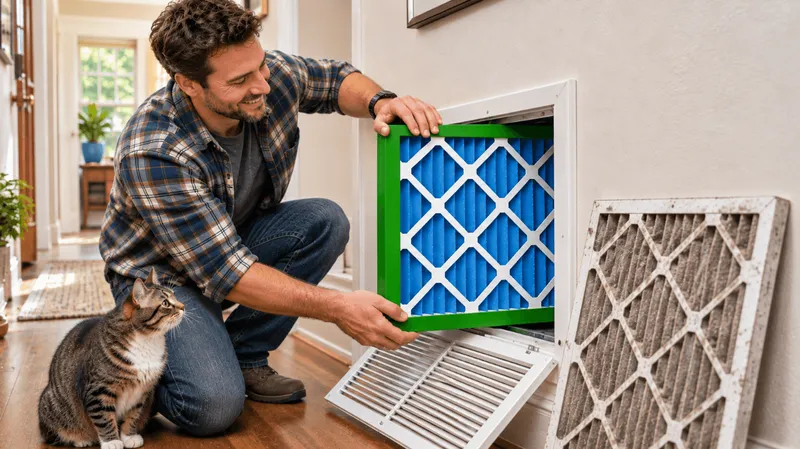
Pull and inspect the air filter. If the pleats are gray or matted, replace it and date the frame. ENERGY STAR recommends checking the filter once a month, and filters load faster during heavy heating or cooling seasons.
Make sure the filter fits. Measure the slot rather than the old filter, and confirm the depth as well as the length and width. Gaps around the frame let dusty air slip past the filter and onto the coil. This step-by-step guide to measuring an air filter covers fractional and ceiling-return slots.
Open supply registers and clear the returns. Closed vents and blocked return grilles starve the system of air.
Call a licensed HVAC technician if recovery stays long with a clean filter and open vents. Coil and refrigerant problems need a pro.
How Does Recovery Work on a Heat Pump?
On a heat pump, smart recovery warms your home gradually with the compressor rather than leaning on costlier auxiliary heat. Some thermostats set up for heat pumps use two recovery ramps, one for the compressor and one for auxiliary heat. Aux heat only comes on if the temperature isn't rising fast enough.
That makes airflow even more important. Restricted airflow slows how fast the temperature rises, which makes the second ramp, and backup heat, more likely. Keep setbacks modest, since the Department of Energy notes that standard setbacks can make a heat pump run inefficiently unless the thermostat is designed for it. For more on backup heat, see this explainer on what "Aux Heat" means on a thermostat.
Should You Turn Off Thermostat Recovery?
For most homes, no. Recovery lets you use energy-saving setbacks without waking to a cold house, and the Department of Energy says setbacks can save as much as 10% a year. Turn it off only if you'd rather the system start exactly on schedule.
Where to find the setting (menus vary by model):
Honeywell T5 and T6 Pro: Touch Menu, scroll to RECOVERY, and touch Select. Then turn it off and press Done. On ElitePRO models, go to Menu, Preferences, Adaptive Recovery.
ecobee: Use the thermostat's settings menu or the ecobee web portal.
Google Nest: In the Google Home app, go to Settings, then Nest sense, then Early-On.
Supporting Statistics
Only one-third of homes with a programmable or smart thermostat use its scheduling features. Source: U.S. Energy Information Administration, 2020 RECS.
ENERGY STAR smart thermostats must cut heating run time by at least 8% in real homes. Source: ENERGY STAR (U.S. EPA).
A typical AC coil gets dirty enough to double its pressure drop in about 7.5 years, and sooner when air slips past a poorly fitted filter. Source: Lawrence Berkeley National Laboratory, via U.S. DOE OSTI.
Frequently Asked Questions
How long does thermostat recovery take?
It depends mostly on how deep your setback is and the weather outside. In one manufacturer's example, a 5°F recovery takes about an hour, but some thermostats can start up to five hours early.
Does thermostat recovery work in summer?
Yes. Recovery works in cooling mode too, so the thermostat pre-cools the same way it preheats. In cooling season, the Department of Energy notes that a clogged filter can let dirt bypass it and coat the evaporator coil, which reduces its ability to absorb heat and slows recovery further.
Does thermostat recovery use more energy?
It can in some homes. Early preheating may use more energy because the system runs longer, which is why some thermostats let you cap how early it starts. The savings come from the setbacks that recovery makes comfortable.
Is "Recovery" the same as "Aux Heat"?
No. Recovery means the thermostat started early, while Aux Heat means a heat pump's backup heat is running. They overlap when a heat pump can't keep up alone.
Why does my Honeywell thermostat say "Recovery" at 4 a.m.?
It's getting ready for your Wake period, because it has learned your home needs that much lead time. If the start time keeps creeping earlier in similar weather, check your air filter.
Glossary
Adaptive Intelligent Recovery (AIR): Honeywell Home's feature, also called Smart Response, that learns how long an HVAC system takes to reach a set temperature and starts it early.
Smart Recovery: ecobee's smart thermostat feature that pre-heats or pre-cools before a schedule change.
Early-On: Google Nest's feature that starts heating or cooling early to hit a scheduled temperature.
Setback: An energy-saving temperature programmed for when you're asleep or away.
Auxiliary heat (Aux Heat): Backup heat, usually electric strips, that helps a heat pump when it can't keep up.
MERV: Minimum Efficiency Reporting Value, a 1-16 rating of how well an HVAC air filter captures particles. Higher ratings capture smaller particles but can add airflow resistance, so check your system's specifications.
About the Author and Reviewer
Michelle Wan is an air quality writer who focuses on HVAC filtration and home maintenance.
Technically reviewed by David Clark, an EPA-certified, licensed HVAC technician with experience in installation and maintenance.