
How to Tell If Your Thermostat Is Bad (and When to Replace It)
November 25, 2026
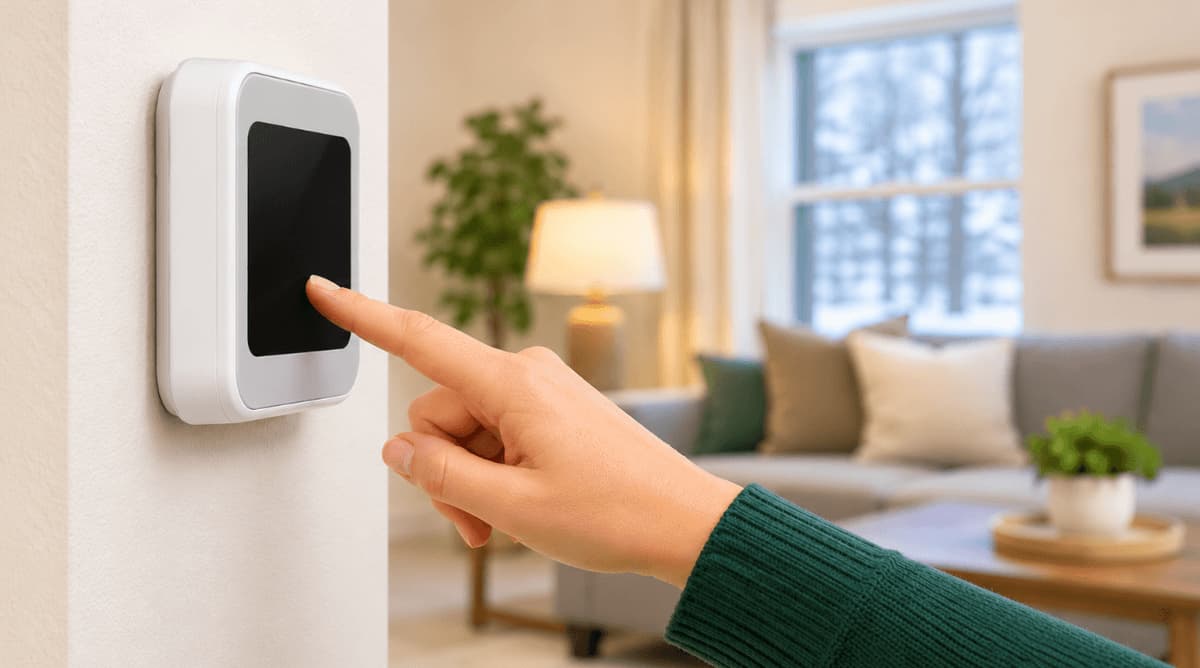
Not sure if the thermostat is really the problem? Work through three quick checks, in order. Each one rules out a cause, so you know whether to fix it, test further, or replace it.
A new thermostat can't fix low airflow. And a smart model that keeps rebooting may only need steady power. Knowing which problem you have keeps you from buying a part you don't need.
Use the quick guide below to see where your symptoms point. Then take the match quiz, or shop air filters at Filterbuy.
Is it the thermostat? A 3-step check
Rule out the easy causes before you test or replace anything.
1 · RULE OUT AIRFLOW
Filter
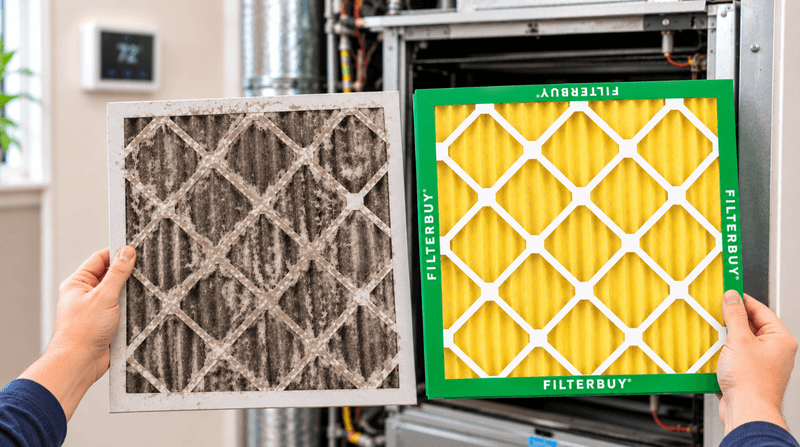
Hold it up to a light. Clogged or gray? Put in a fresh one.
Vents
Open every supply and return vent in the house.
Ice
Ice on the lines or indoor coil? Turn cooling off and run the fan to thaw it.
Furnace
Switch on and blower door latched. An open door stops the system.
Symptom gone? The thermostat wasn't the cause.
2 · TEST THE THERMOSTAT
For low-voltage (24-volt) systems only. Go by terminal letters, not wire colors.
Call test
Fresh batteries. Change the setpoint by 5 degrees. Wait 5 minutes.
No click: the thermostat or its power.
Jumper test
Power off. Connect R to W (Y for cooling or a heat pump, G for the fan). Power on.
System starts: the thermostat or its wiring.
Multimeter test
Power on. Measure AC volts across R and C. Honeywell Home cites 20–30 V AC.
Near 0 volts: the problem is upstream, like a breaker or fuse.
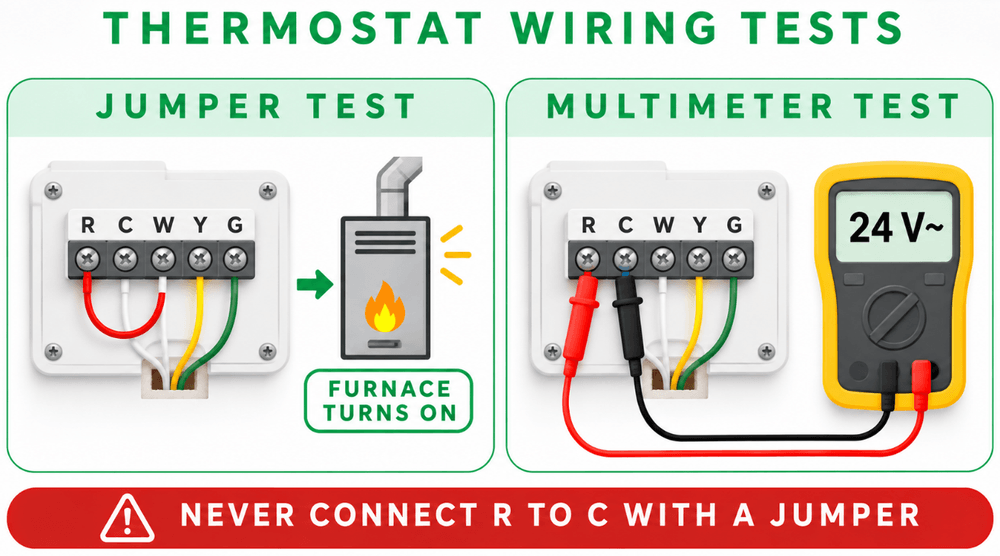
Safety first: Never connect R to C. It can blow the fuse on the furnace control board. Skip these tests for line-voltage (120/240V) electric heat or communicating systems, and call a pro.
3 · REPAIR OR REPLACE?
Repair first if
- Settings act up: try a reset and tighten loose wires
- The screen fades or blinks: change the batteries
- A smart model reboots or drops Wi-Fi: check for a C wire
Replace if
- The system runs on the jumper but not with the thermostat
- It can't control a new heat pump or second stage
- It's a mercury dial model (recycle it, don't trash it)
Typical thermostat life
Dial or lever
Up to 35 yrs
Digital or programmable
About 10 yrs
Smart (Wi-Fi)
About 10 yrs
Smart models often reach their end when app and software support stops, even if the hardware still works.
Filterbuy guidance built from Google Nest Help, Honeywell Home, InterNACHI, and Angi. Have a licensed technician confirm any equipment fault before replacing parts.
Start with the fastest fix on the list.
A fresh filter is the quickest check before you test or replace a thermostat. Answer a few quick questions and we'll match you to the right filter for your home.
Already know your size?
TL;DR
How can you tell if your thermostat is bad? Look for a dead or flickering screen, settings that won't stick, a system that won't start or stop, and readings that don't match the room. Because a clogged air filter can cause the same trouble, Filterbuy's rule is filter first, thermostat second. If the filter checks out and the system runs with the thermostat bypassed, replace the thermostat.
Key Takeaways
Signs of a bad thermostat include a blank or erratic screen, lost settings, no response to changes and a system that won't stop running.
Airflow problems often look like thermostat problems. In Filterbuy's experience, the thermostat sets the target, but airflow decides whether your home reaches it.
You can test a thermostat with a jumper wire or a multimeter, and a smart model that keeps rebooting may only need a C wire.
Thermostat lifespan depends on type, from about 10 years for smart models to 35 for simple dials.
Replace the thermostat when it fails a bypass test, can't control your equipment or contains mercury.
How Can You Tell If Your Thermostat Is Bad?
A bad thermostat stops sending reliable signals to your heating and cooling equipment. You'll usually notice a blank or rebooting display, schedules that reset themselves, no response when you change the temperature, or a system that runs nonstop or won't start. The surest test: if the system works with the thermostat bypassed, the thermostat is the problem.
Many of these symptoms start elsewhere. At Filterbuy, we cut, pleat and frame air filters to order in our own plants in Alabama, Pennsylvania and Utah, so we see these complaints from the return side of your system. In our experience, the thermostat only sets the target, and airflow decides whether your home actually reaches it.
Filterbuy guidance, built from Google Nest Help. Have a technician confirm equipment faults.
Rooms lagging? Here's why your heat won't reach the set temperature. A dark display has its own thermostat blank screen fixes.
"When readers ask me what to set their thermostat to, I tell them 68 in winter and 78 in summer. Then I ask when they last changed their filter."
– Michelle Wan, Brand Manager & Air Quality Writer, Filterbuy
Rule Out the Air Filter Before You Test the Thermostat
Filterbuy's rule is to check the filter before the thermostat, because it takes a minute and can save you a new thermostat. Turn the system off, slide the filter out and hold it up to a light. If light barely passes through or the media looks gray and matted, put in a fresh one and see whether the symptom clears.
Google's Nest Help explains why: a dirty filter can make a furnace overheat and can ice the AC's evaporator coil (the indoor coil that absorbs heat). Either way, the system stalls and the thermostat takes the blame.
Filterbuy's four-point rule-out:
Check the filter. Not sure where it is? Here's where your air filters are located.
Open every supply and return vent.
Look for ice on the refrigerant lines or indoor coil. If you find any, turn cooling off and run the fan until it thaws.
Make sure the furnace switch is on and the blower door is latched, since an open door stops the system.
Filterbuy makes filters in 1-, 2-, 4- and 5-inch depths, and a 1-inch filter holds far less pleated media than a 4- or 5-inch one, so it clogs sooner. If symptoms keep coming back every few weeks, change your filter more often.
If the furnace keeps shutting off within minutes, learn why furnaces overheat and how filters play a part.
How to Test a Thermostat
To test a thermostat, work through three checks in order: a call for heat or cooling, a jumper-wire bypass and a multimeter power check. If the system starts with the thermostat bypassed, the thermostat is bad. If the multimeter finds no power at the thermostat, the problem is upstream of it.
Before you start: these tests are for low-voltage (24-volt) thermostats. If yours runs baseboard or in-wall electric heat (line voltage) or a communicating system, skip them and call a pro.
The call test. Replace any batteries, change the setpoint (the temperature you set) by 5 degrees, and give it 5 minutes, since many systems have a built-in delay. A click with no equipment response points past the thermostat, while no click at all points to the thermostat or its power.
The jumper (bypass) test. Turn off power at the breaker or furnace switch. Remove the thermostat face, loosen the red (R) and white (W) wires from the base, twist their bare ends together and restore power. If the furnace starts, the thermostat or its wiring was the problem. To test cooling or a heat pump, twist R to yellow (Y); for the fan, use green (G). Never connect R to C (the common wire), which can blow the low-voltage fuse on the furnace control board.
The multimeter test. With power on, set a multimeter (a handheld voltage meter) to AC volts and touch the probes to the R and C wires. Honeywell Home says its thermostats run on 20–30 volts AC and that readings outside that range need a professional. Near zero points upstream: a tripped breaker, open furnace door, blown fuse or damaged wire.
Go by terminal letters rather than wire colors, and put every wire back.
Filterbuy pro tip: If the furnace starts on the jumper but shuts off within minutes, the thermostat isn't the cause. That usually points to overheating, so check the filter and call a technician.
What to Tell Your HVAC Technician
Before calling for help, note:
A photo of the wiring, with terminal letters visible
What the call, jumper and multimeter tests showed
Thermostat brand, model and age
Filter size, depth and last change date
Any blinking code on the furnace's status light
Is Your Smart Thermostat Bad or Just Underpowered?
A smart thermostat that reboots, drops Wi-Fi, shows low-battery warnings or goes dark is often underpowered rather than broken. Wi-Fi models need steady 24-volt power, and many get it through a C wire. Honeywell Home says a C wire is required for its thermostats to power themselves, so a new thermostat may not help.
Before you buy a replacement, check the C terminal on the wall plate. If it's empty, look for an unused wire tucked into the wall; Filterbuy's thermostat wiring colors guide shows where it connects. A C-wire adapter is another option.
How Long Does a Thermostat Last?
A thermostat can last anywhere from about a decade to several decades, depending on its type. InterNACHI's life expectancy chart, from the home inspectors' association, estimates thermostats may last 35 years, though most are replaced sooner because the technology improves. Smart thermostat lifespan often ends when the maker stops supporting the app, even while the hardware still works.
Sources: InterNACHI (mechanical) and Angi (programmable and smart).
Angi, a home-services marketplace, puts programmable and smart thermostat lifespan at about 10 years. Support can end sooner: Google ended support for the 1st- and 2nd-generation Nest Learning Thermostats on October 25, 2025, dropping them from its apps.
When you do upgrade, Filterbuy suggests a model with a runtime-based filter reminder, a better cue than the calendar alone.
When to Replace a Thermostat
Replace a thermostat when it fails the jumper test, keeps rebooting despite good power, can't run your equipment, contains mercury or has lost app support you rely on. If it's 10-plus years old and acting up, replacing it usually beats another round of fixes.
Repair first if:
Settings act up; try a thermostat reset and tighten loose wires.
The screen fades or blinks; try a thermostat battery change.
Still stuck? Work through why your thermostat is not working.
Replace if:
The system runs on the jumper but not with the thermostat connected.
You've added a heat pump or second stage the old model can't control.
It's a dial model with a glass mercury bulb inside the cover.
Never put a mercury thermostat in the trash; recycle it with the cover on. An EPA-hosted report on mercury thermostat take-back programs says each one holds about 4 grams of mercury, and the industry-funded Thermostat Recycling Corporation collects them nationwide.
Budgeting for a new one? See how much it costs to replace a thermostat.
Filterbuy's take as a filter maker: a new thermostat can't fix low airflow. Once it's installed, keep the filter on schedule with Filterbuy Auto Delivery. In Florida, our Filterbuy HVAC Solutions team installs and services smart thermostats.
Filterbuy isn't affiliated with or endorsed by Google, Resideo (Honeywell Home), InterNACHI or Angi.
Supporting Statistics
About 48% of U.S. homes with a thermostat used a programmable model in 2020.
That's 52.59 million homes; another 12.78 million had a smart model.
Source: U.S. Energy Information Administration, 2020 RECS Table HC6.1
Replacing a dirty, clogged filter can cut an air conditioner's energy use by 5%–15%.
An ENERGY STAR certified smart thermostat saves the average home about 8% on heating and cooling, or $50 a year.
Frequently Asked Questions
Can a Bad Thermostat Cause Short Cycling?
It can, if a faulty sensor or a spot near a vent or lamp makes it misread the room. A dirty filter can also overheat the furnace until its high-limit switch shuts it off, so check the filter first.
Should I Replace a Thermostat Myself?
Many homeowners can swap a standard 24-volt thermostat after shutting off power and labeling every wire. Call a licensed technician for line-voltage heat, communicating systems or a test that points to the furnace or AC.
Is It the Thermostat or the Furnace?
Run the jumper test. If the furnace starts with R and W twisted together, the thermostat or its wiring is at fault. If it doesn't, or it shuts off soon after, look at the furnace.
Can a Thermostat Read the Wrong Temperature?
Yes. Sun, a nearby lamp, a supply vent or dust on the sensor can skew it. Compare it with a thermometer for a day; a steady gap can usually be fixed with a temperature offset.
Can a Bad Thermostat Raise My Energy Bill?
It can. A thermostat that misreads or short cycles makes your system work harder. So does a clogged filter; the DOE says replacing one can cut AC energy use by 5%–15%.
Glossary
Setpoint: The temperature you set.
Short cycling: A system turning on and off every few minutes.
High-limit switch: A furnace safety switch that shuts off the burners when the furnace gets too hot, often from low airflow.
C wire (common wire): The return wire that gives a thermostat steady power.
Jumper test: Bypassing the thermostat by connecting R to another wire.
Line voltage: 120- or 240-volt power, used by some electric-heat thermostats.
Filterbuy: A U.S. manufacturer of 1- to 5-inch HVAC air filters and the company behind Auto Delivery.