
Air Purifier Not Working? Fix Weak Airflow, Odors, And A Stuck Filter Light
August 17, 2026
Most air purifier problems (weak airflow, returning odors, or a filter light that won't reset) trace back to one cause: a loaded or incorrectly installed filter. Working through a short diagnostic sequence in the right order gets you to the fix in under 15 minutes, without tools.
You know something's off. The unit is running, but the air coming out feels softer than it used to. Or a smell you thought was gone has quietly returned. Or you replaced the filter, hit reset, and the indicator light is still on. These three symptoms share a common thread: airflow restriction. Checking things in the right order saves time and keeps you from replacing parts you don't need to.
Key Takeaways
Airflow restriction is a common cause of issues like reduced air output, persistent odors, or indicator lights staying on after a filter change.
Addressing these symptoms systematically helps identify the problem quickly and avoids unnecessary part replacements.
Following the recommended troubleshooting sequence can resolve the issue in under 15 minutes without requiring any tools.
Start Here: Confirm It's Actually An Airflow Problem
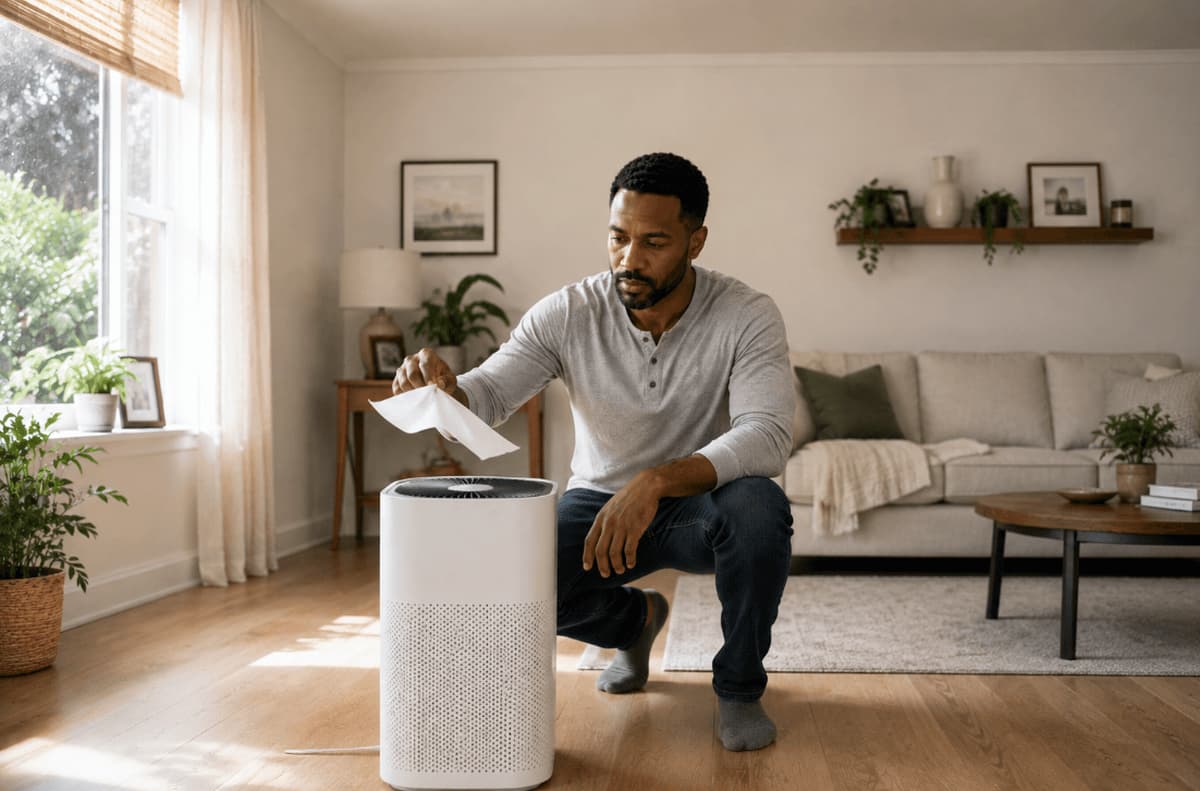
Before touching anything inside the unit, run one quick test. Hold a single sheet of tissue paper near the outlet vent while the unit runs on its highest fan setting. A healthy unit lifts and holds the tissue flat. Weak flutter or no movement at all confirms restricted airflow.
Once you know what you're dealing with, match your situation to the table below:
Find Your Starting Point
Match what you observe with the likely cause, then jump to the recommended step.
| What You Observe | Likely Cause | Where to Go |
|---|---|---|
| Fan audible + weak airflow | Airflow restriction | Step 1 |
| Fan audible + no airflow | Internal obstruction or fan issue | Step 4 |
| No fan sound + unit powered | Power issue or panel lockout | Step 5 |
Start at the step that matches your situation. Each section stands on its own.
Step 1: Check The Filter (This Is The Cause Most Of The Time)
Always unplug the unit before opening any panel or handling the filter.
Remove the filter and inspect it under good light. A spent HEPA filter reads gray to dark gray across the entire pleat face, not just along the outer edges. Edge darkening alone is normal accumulation near the frame. Full-face gray means the media is loaded and airflow through it has dropped significantly.
Vacuuming a spent HEPA filter does not restore it. The particles that restrict airflow are embedded in the fiber matrix, not sitting on the surface. Vacuuming removes loose debris from the face but leaves the restriction in place. If the filter is loaded, replace it.
Pre-filters are handled differently. Most pre-filters are designed for periodic cleaning. Rinse with cool water, let it dry completely (several hours, or overnight), then reinstall. A damp pre-filter placed back in the unit will restrict airflow and may cause the motor to work harder than it should.
Why Odors Are Returning Even When Particles Aren't
Carbon filters give no visual signal when they're saturated. A loaded carbon layer looks identical to a fresh one. If odors are returning on a schedule, or if you're past the manufacturer's recommended replacement interval, the carbon layer is the most likely cause. Carbon cannot be refreshed by vacuuming or air-drying. Replace the filter, then run the unit on low for 10 minutes before re-running the tissue test.
“Most of the calls we get that start with ‘I think my unit is broken’ end with a filter swap. People are surprised, but a heavily loaded filter can drop airflow enough that the unit barely feels like it’s running.
The Mistake That Fakes A Dead Unit
Three installation errors consistently cause "no airflow" calls after a new filter is installed:
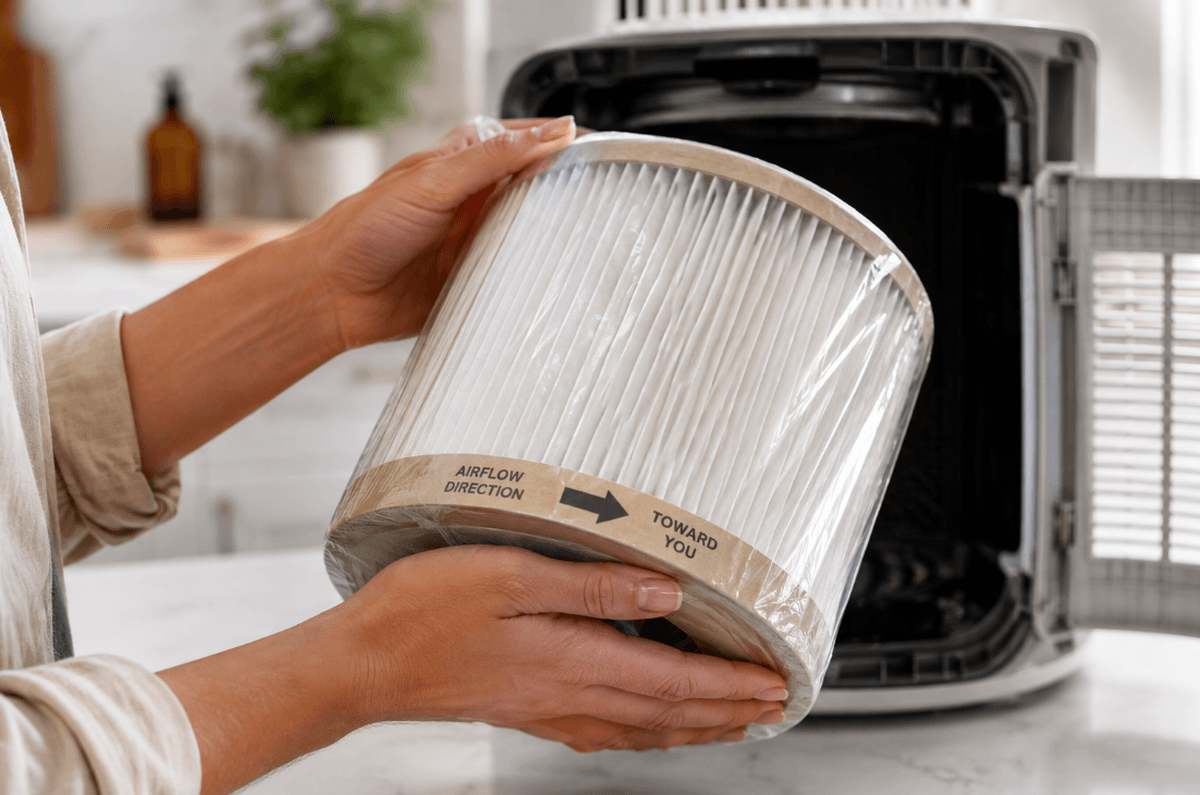
Plastic wrap left on the filter. New filters ship with protective film covering the media. If that film stays on, airflow is almost completely blocked.
Filter installed backward. Most filters have airflow arrows printed on the frame. The arrow should point toward the unit's interior—toward the fan—not toward you.
Filter seated proud of the housing. If the filter sits slightly high or at an angle, the access door won't fully close. Many units are designed to reduce fan speed or shut off when the door isn't seated. Press the filter firmly into place and confirm the door closes flush.
After installing a correctly seated filter, reset the indicator light, run the unit on low for 10 minutes, and re-run the tissue test.
Step 2: Clear The Intake And Exhaust
Unplug the unit before cleaning any external surfaces.
Intake grilles pull in room air. Over time, they collect enough dust and fiber to measurably reduce airflow, and clogged grilles also affect how air quality sensors read the room, which can cause the unit to hold itself at lower fan speeds in automatic mode.
Use a vacuum with a soft brush attachment to clear the grilles. Never spray liquid cleaner directly into the unit. Once the grilles are clear, check the unit's position. Pull it at least six to twelve inches away from walls, curtains, and furniture. Corner placement and soft surfaces directly behind the intake restrict the air the unit can draw in, which limits overall output.
Step 3: Rule Out The Settings That Mimic A Fault
Before assuming hardware, check the control panel. Several standard operating modes produce symptoms that look like a mechanical problem:
Auto mode adjusts fan speed based on sensor readings. If the room reads clean, the unit may hold itself at its lowest speed. This is correct behavior, not a malfunction.
Sleep or night mode caps fan speed intentionally. The unit won't reach full output until the mode is exited.
Child lock disables panel input without changing fan operation. An unresponsive panel with a running fan usually points here—check your manual for the unlock sequence.
Protective speed reduction. Some units automatically reduce fan speed when the filter is heavily loaded to prevent motor strain. If auto mode and sleep mode are both off and the fan is still underperforming, loop back to Step 1.
Step 4: Look For A Physical Obstruction
Unplug the unit before inspecting the fan area.
With the unit powered off and unplugged, open the filter compartment and look toward the fan. Hair, lint, and small objects sometimes pass the pre-filter and accumulate near the fan blades or motor housing. A rattle or grinding sound during operation usually points to a loose object in the fan path or a filter cover that isn't fully latched.
Remove anything visible by hand or with a soft brush. Do not use liquids, compressed air canisters, or sharp tools inside the unit. If the obstruction isn't visible or accessible without disassembling the housing, stop here. Anything beyond clearing a visible debris blockage falls outside homeowner troubleshooting: contact the manufacturer's support team at that point.
Step 5: When The Filter Light Won't Clear
The filter indicator on most units is a runtime timer, not a sensor that reads the actual condition of the filter media. It counts operating hours and triggers at a preset interval regardless of how dirty (or clean) the filter actually is.
General reset process: With the new filter installed and the door fully closed, press and hold the button marked with a filter icon (or labeled "Reset," "Filter Reset," or similar). Hold for 3 to 10 seconds until the light clears or the unit beeps. Check your manual for the exact hold time, since it varies by model.
If the light stays on after the standard reset:
Unplug the unit, wait 60 seconds, restore power, then retry the reset sequence.
If still illuminated, open the filter compartment and confirm the filter is fully seated. Many units use a pressure switch or door sensor to detect that the compartment is closed. A filter that's even slightly out of position can prevent the reset from registering.
If the light remains on after all of the above, the control board may not be cycling the timer correctly. Contact the manufacturer's support line and reference your warranty.
One important distinction: a filter light that comes on with an old filter is giving you accurate information. A filter light that stays on after a confirmed new filter installation is a nuisance, but don't disable or cover it. If it's malfunctioning, that's a warranty conversation, not a workaround.
Symptom-To-Cause Quick Reference
Use the symptoms below to quickly identify the most likely cause and what to do next.
| Symptom | Most Likely Cause | Fix |
|---|---|---|
| Airflow weaker than it used to be | Loaded filter media | Inspect and replace the filter |
| Odors returning, particles still handled | Saturated carbon layer | Replace filter: carbon can't be cleaned |
| New filter installed, still no airflow | Packaging left on filter | Unplug, remove all wrapping, reinstall |
| Unit stuck on lowest fan speed | Auto/sleep mode, or protective speed reduction | Check mode settings, then check filter |
| Filter light on after replacement | Timer not reset | Hold reset button 3 to 10 seconds |
| Rattling or grinding sound | Loose cover or debris in fan path | Unplug, inspect, remove debris by hand |
How To Keep It From Happening Again
Waiting for the filter light to act is reactive. The light triggers on a generic timer that doesn't account for how hard your unit is working: a unit running in a dusty workshop loads a filter faster than one running in a bedroom. A few habits keep performance consistent between replacements:
Replace on a schedule, not just on the light. The light triggers on a generic timer and doesn't account for how hard your unit is actually working. Check your filter on a regular basis and replace it based on its condition and your environment.
Rinse the pre-filter every two to four weeks. A clean pre-filter extends the life of the HEPA and carbon layers behind it.
Log the replacement date. Write it on a piece of tape stuck to the back of the unit, or set a calendar reminder. You'll always know where you stand.
Keep a spare filter on hand. When the filter is spent, you want to replace it the same day, not wait for shipping. Browse Filterbuy's replacement filter options to find the right fit for your unit.
Not sure if your filter has reached the end of its useful life? Check the pleat face under good light. If it reads gray to dark gray across the full surface, it's time to replace it. Don't wait for the indicator light; inspect the filter directly and let its condition guide your decision.
Find The Right Replacement Filter At Filterbuy
The diagnostic sequence above handles the most common reasons an air purifier underperforms. In most cases, the fix is a filter swap, and the faster you replace a spent filter, the sooner performance returns to where it should be.
Shop replacement filters at Filterbuy to find the right match for your unit. If you'd like help identifying the correct filter or have questions about replacement intervals, Filterbuy's customer service team is available to help.
Frequently Asked Questions
How Do I Know If My Air Purifier Is Actually Working?
Run the tissue test: hold a single sheet of tissue near the outlet vent on the highest fan setting. The tissue should lift and hold steady. If it barely moves, airflow is restricted, most likely by a loaded filter. You can also compare the sound level to when the unit was new; a laboring motor often runs louder under restriction.
Can I Clean A HEPA Filter Instead Of Replacing It?
No. HEPA filters trap particles inside the fiber matrix, not just on the surface. Vacuuming removes loose debris from the face but leaves the embedded restriction in place and can damage the media. Pre-filters (the coarser outer layer on many units) are a different story. Most are designed to be rinsed and reused. Check your manual to confirm which layers in your unit are washable.
Why Does My Air Purifier Smell Bad After A Filter Change?
A new carbon filter often has a faint off-gassing smell for the first 24 to 48 hours of operation. This is normal and dissipates on its own. If a bad smell appears after a filter change and doesn’t clear within a couple of days, confirm the old packaging was fully removed (protective film left on the filter can trap and recirculate odors). If the smell is musty, also check that the pre-filter was completely dry before reinstallation.
Why Is My Air Purifier Stuck On The Lowest Fan Speed?
Three things cause this most often: auto mode reading the room as already clean, sleep or night mode capping output, or a heavily loaded filter triggering the unit's protective speed-reduction function. Check your mode settings first. If auto and sleep mode are off and speed is still low, inspect the filter. A filter that's gray across the full pleat face needs to be replaced.
Does The Filter Light Mean The Filter Is Actually Full?
No. The filter indicator is a runtime timer, not a sensor that measures filter condition. It triggers after a set number of operating hours, regardless of actual filter loading. A unit running continuously in a high-dust environment may need a filter change before the light comes on. A unit running a few hours a day in a clean space may still have usable filter life when the light triggers. Use the light as a prompt to inspect, not an automatic replacement command.
Can A Dirty Filter Damage The Motor?
Yes, over time. A heavily loaded filter forces the motor to work harder to pull air through restricted media. Sustained high strain increases motor temperature and accelerates wear. Some units reduce fan speed automatically to protect the motor when the filter is loaded, which is why a stuck-on-low symptom sometimes traces back to a filter problem rather than a settings issue. Replacing filters on schedule is one of the simplest ways to extend the unit's service life.